

Download SimpleDiagrams – free diagram design tool for Windows, Mac, and Android
Overview
SimpleDiagrams is a lightweight, Adobe‑Air‑based application that aims to make diagram creation effortless for anyone who struggles with freehand drawing. Whether you need flowcharts, organizational charts, or quick brainstorming sketches, SimpleDiagrams provides a drag‑and‑drop canvas that reduces the learning curve dramatically. The free version includes the same core functionality as the paid edition, with the only limitation being a persistent upgrade prompt.
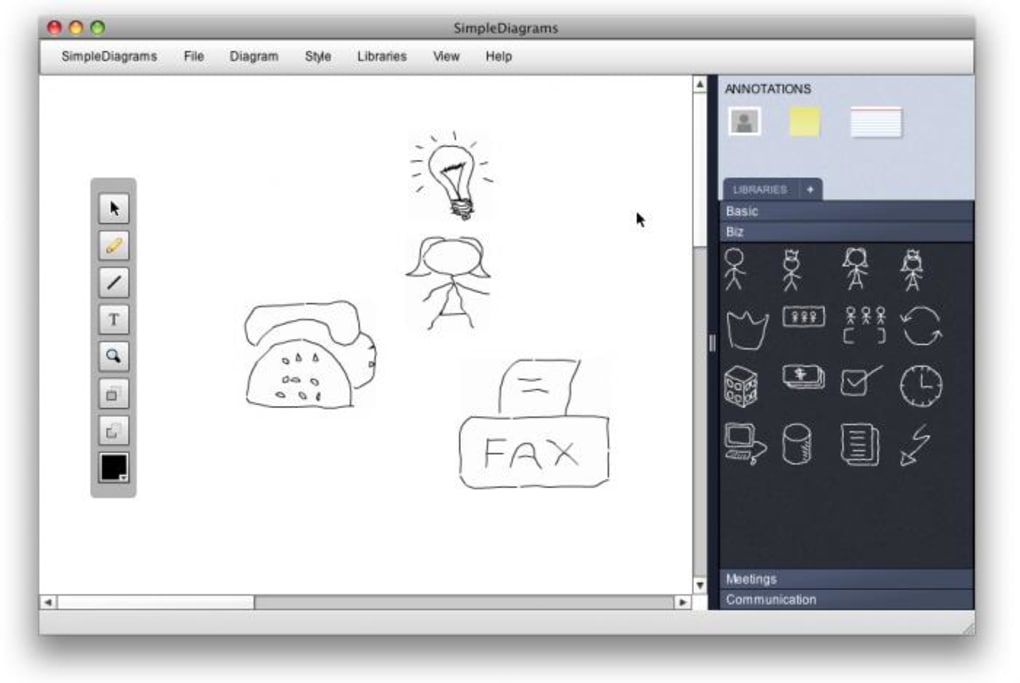
This design choice keeps the tool accessible while still offering a taste of the premium experience. Users appreciate the ultra‑slick interface that separates the toolbox from the drawing area, allowing quick insertion of shapes, connectors, and text blocks. One of the most compelling aspects is the ability to toggle between crisp, geometric elements and a hand‑drawn style that adds a human touch to presentations.
Although the export options are limited to XML and PNG, the simplicity of these formats means you can embed the graphics into reports, slide decks, or collaborative platforms without compatibility headaches. The lack of built‑in sharing features might seem like a drawback, but the straightforward file‑based workflow makes version control easy for small teams. Overall, SimpleDiagrams positions itself as an ideal solution for students, project managers, and casual users who need a reliable, free diagramming tool without the bloat of enterprise‑grade software.
Key Features
- Intuitive drag‑and‑drop canvas for rapid diagram assembly.
- Dual visual styles: clean geometric shapes and optional hand‑drawn look.
- Full‑featured flowchart library – decision nodes, processes, inputs/outputs.
- XML export for easy data interchange and PNG export for high‑resolution images.
- Adobe Air runtime ensures cross‑platform compatibility on Windows and macOS.
- Zoom, grid snap, and alignment guides to keep layouts tidy.
- Keyboard shortcuts for common actions (copy, paste, delete, undo/redo).
- Unlimited undo history within a session, preventing accidental loss.
- Free version includes all premium diagramming tools; only a nag screen prompts upgrade.
- Lightweight installer – under 30 MB, quick download and installation.
Installation & Usage Instructions
Getting started with SimpleDiagrams is straightforward. First, download the installer from the official website. The file is an .exe for Windows or a .dmg for macOS; both packages bundle the required Adobe Air runtime, so you won’t need to install anything separately. Run the installer and follow the on‑screen prompts – the process typically takes less than two minutes on a standard broadband connection.
Once installed, launch SimpleDiagrams from your desktop shortcut or start menu. The main window opens to a blank canvas with a toolbar on the left. To create a diagram, simply click a shape (rectangle, ellipse, diamond, etc.) and drag it onto the canvas.
Connectors appear automatically when you hover over a shape, allowing you to click and draw arrows to other elements. Text can be added by double‑clicking any shape, which opens an inline editor. For a more personalized aesthetic, click the “Style” button in the toolbar and switch between “Geometric” and “Hand‑Drawn” modes – the latter adds subtle irregularities that mimic a sketch.
Saving your work is done via File → Save As. Choose XML if you plan to edit the diagram later or share it with teammates who also use SimpleDiagrams. For presentations, select PNG to export a raster image at 300 dpi – suitable for PowerPoint or Google Slides. Although the free version does not include direct cloud sync, you can manually upload the PNG or XML file to any file‑sharing service (Google Drive, Dropbox, etc.) for collaboration.
Keyboard enthusiasts will appreciate shortcuts such as Ctrl + Z for undo, Ctrl + C/Ctrl + V for copy/paste, and Del to remove selected objects. The “Zoom” slider at the bottom right helps you focus on intricate sections without losing sight of the overall layout. With these basics mastered, you’ll be able to draft flowcharts, process maps, or simple network diagrams in minutes.
Compatibility and System Requirements
SimpleDiagrams runs on any operating system that supports Adobe Air 2.5 or later. This includes Windows 7, 8, 10, and 11, as well as macOS 10.10 (Yosemite) through macOS 14 (Sonoma). Because the application is built on Adobe Air, it remains lightweight and does not require a powerful GPU – a standard integrated graphics card is sufficient. Minimum RAM requirement is 512 MB, though 1 GB is recommended for smoother performance when handling large diagrams. Disk space needed for the installer and runtime is under 30 MB, making it ideal for low‑spec machines or older laptops.
For mobile platforms, SimpleDiagrams does not have a native iOS or Android app, but the Adobe Air framework can be leveraged to run the same .air package on Android tablets with the Air runtime installed. However, the desktop experience remains the most feature‑complete version. Users on Linux can run SimpleDiagrams through Wine, though official support is not provided. Overall, the cross‑platform nature of Adobe Air ensures that the same diagram files can be opened and edited on any supported device, preserving visual fidelity and layout integrity.
Pros and Cons
Pros
- Free version offers full diagramming capabilities – no feature lockout.
- Intuitive drag‑and‑drop UI reduces learning time for beginners.
- Hand‑drawn style adds personality to otherwise sterile charts.
- Lightweight installer and low system requirements.
- XML export enables easy version control and future editing.
- Keyboard shortcuts and alignment guides improve productivity.
Cons
- Limited export formats – only XML and PNG are supported.
- No built‑in cloud sharing or collaboration features.
- Adobe Air dependency may be considered outdated by some users.
- Upgrade nag screen can be intrusive in the free version.
- No native mobile apps for iOS or Android.
Frequently Asked Questions
Is SimpleDiagrams really free or is it a trial?
SimpleDiagrams offers a completely free version that includes every core feature found in the paid edition. The only difference is a persistent upgrade prompt; there are no hidden time limits or feature restrictions.
Can I import diagrams from other tools like Visio?
Direct import of Visio (.vsdx) files is not supported. However, you can recreate diagrams manually using SimpleDiagrams’ shape library, or export your Visio diagram as an image and import it as a background layer for tracing.
What file formats can I export to besides PNG?
The free version currently exports only PNG for raster images and XML for editable data. The paid edition adds SVG and PDF export, which are useful for high‑resolution printing and vector‑based workflows.
Is Adobe Air still supported on the latest macOS versions?
Adobe discontinued official Air updates in 2020, but the last stable release works on macOS up to Sonoma (14). Users on newer versions may need to enable “Allow apps from identified developers” in Security & Privacy settings.
How secure is my diagram data when saved as XML?
XML files are plain text, so they can be opened in any editor. For added security, you can encrypt the file using third‑party tools (e.g., 7‑Zip with AES‑256) before sharing it.
Final Verdict & Call to Action
SimpleDiagrams strikes a balance between simplicity and functionality that many free diagramming tools fail to achieve. Its drag‑and‑drop interface, coupled with the optional hand‑drawn aesthetic, makes it a standout choice for students, educators, and small‑team project managers who need quick visual communication without a steep learning curve. While the limited export options and lack of native collaboration features may deter power users, the core experience remains solid and reliable. If you’re looking for a free, secure, and easy‑to‑install diagram tool that works on both Windows and macOS, SimpleDiagrams deserves a spot on your software list. Download it today, create your first flowchart, and experience how effortless diagramming can be.
Click here to download SimpleDiagrams for free and start turning ideas into clear, professional‑looking diagrams in minutes.







